Jenkins, Docker, and Cloud Run: Building a Pipeline That Actually Deploys
A few weeks ago, I wrote about how I built a zero-collision URL shortener in Go using a 4-round Feistel cipher, Redis caching, and a bunch of SRE patterns. At the end of that post, I listed what was next for the project:
CI/CD Pipelines: Setting up GitHub Actions to build, lint, test, and package Go images automatically.
Well, something happened...
While going deeper into DevOps, I stumbled into Jenkins — the battle-hardened, self-hosted CI/CD tool that half the industry quietly runs their pipelines on. I decided to use the URL shortener as my guinea pig. It was already working perfectly in dev. The goal was simple: make it deploy itself to Google Cloud Run every time I pushed to main. No manual steps. No SSH-ing into servers. Just push, watch the pipeline run, click approve, and it's live.
Simple goals. Complicated execution. Let's get into it.
First, What Even Is CI/CD?
Before I get into the war stories, let me set the scene for anyone new to this.
CI (Continuous Integration) means every time you push code, something automatically checks it — runs your tests, lints your code, builds your Docker image. You get instant feedback on whether you broke something.
CD (Continuous Deployment/Delivery) means that once your code passes those checks and gets merged to your main branch, it automatically deploys to your environments — staging, then production.
The philosophy I was going for is called trunk-based development: you work in short-lived feature branches, open a PR to main, and once it merges, the pipeline does everything else. One source of truth. No long-lived branches. Just ship.
The tool I chose for all of this? Jenkins — the OG of CI/CD. Not the flashiest option in 2025, but it's powerful, self-hosted, and an industry staple worth understanding deeply.
The Architecture
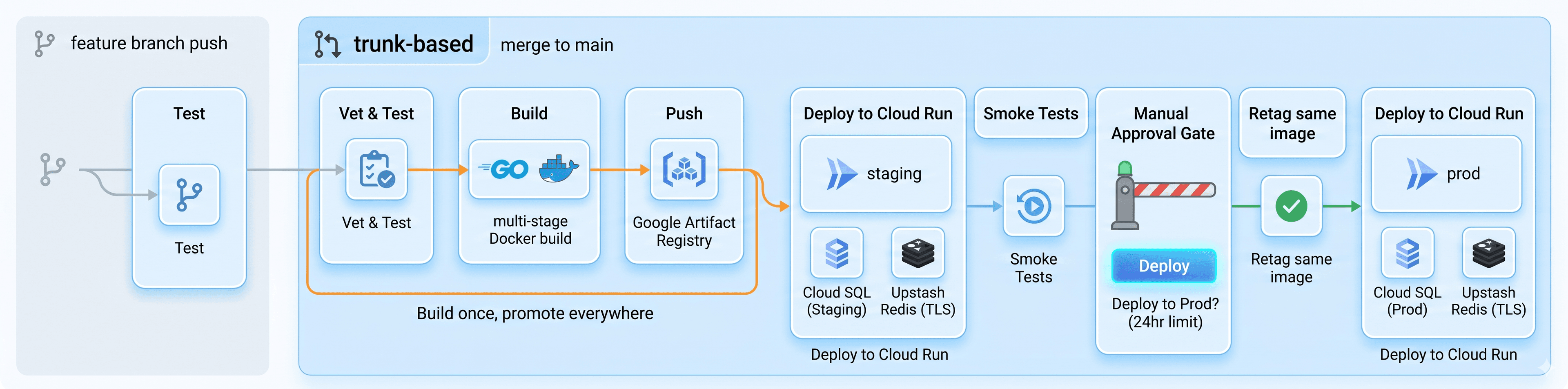
Here's what I was building toward before a single line of Jenkinsfile was written:

A few things I want to call out:
Build once, promote everywhere. The same Docker image that passes staging gets deployed to production. No rebuilds. This is a core CI/CD principle — if you rebuild for prod, you're technically deploying untested code. The SHA-tagged image (url-shortener:sha-a1b2c3d) is immutable and travels through the whole pipeline.
Image tagging strategy: I use three tags — :sha-<commit> as a permanent record of every build, :staging as a moving pointer to what's on staging, and :prod for what's live. Never :latest in a multi-environment setup. It's ambiguous and will eventually bite you.
Manual approval gate: Before prod gets touched, Jenkins pauses and waits for a human to click "Deploy" in the UI. You have 24 hours. If nobody approves, nothing goes to prod. Simple. No extra tooling needed.
The Stack
Jenkins running on a DigitalOcean Droplet (Docker container)
GitHub for source control with a PAT for webhook integration
Google Artifact Registry for storing Docker images
Cloud SQL (Postgres 17) — staging and prod instances
Upstash Redis — managed Redis with TLS (more on why this matters later)
Cloud Run — serverless container deployment on GCP
Go 1.26 — the app itself
Setting Up the Infrastructure
Before touching Jenkins, I set everything up in GCP. The key resources were:
Artifact Registry repository — where images live:
bash
gcloud artifacts repositories create url-shortener \
  --repository-format=docker \
  --location=us-central1 \
  --project=cloudcartel
Two Cloud SQL instances — one for staging, one for prod. I learned the hard way that Postgres 17 on GCP needs the --cpu and --memory flags instead of the old tier names:
bash
gcloud sql instances create url-shortener-staging \
  --database-version=POSTGRES_17 \
  --region=us-central1 \
  --cpu=1 \
  --memory=3840MB \
  --edition=ENTERPRISE \
  --project=cloudcartel \
  --no-backup
A Jenkins service account with exactly three IAM roles — Artifact Registry Writer, Cloud Run Admin, and Cloud SQL Client. Principle of least privilege. Nothing more.
Placeholder Cloud Run services to register them before the pipeline tries to deploy:
bash
gcloud run deploy url-shortener-staging \
  --image=us-docker.pkg.dev/cloudrun/container/hello \
  --platform=managed \
  --region=us-central1 \
  --project=cloudcartel \
  --allow-unauthenticated
Jenkins Is Running in Docker. Inside a Droplet. Let's Talk About That.
My Jenkins setup is a Docker container running on a DigitalOcean Droplet, orchestrated with Docker Compose:
services:
  jenkins:
    build: /opt/jenkins
    container_name: jenkins
    restart: unless-stopped
    ports:
      - "8080:8080"
      - "50000:50000"
    volumes:
      - /opt/jenkins/data:/var/jenkins_home
      - /var/run/docker.sock:/var/run/docker.sock
    environment:
      - TZ=Africa/Nairobi
Notice that /var/run/docker.sock mount. That's DooD — Docker outside of Docker. The Jenkins container talks to the host's Docker daemon via the socket, so when the pipeline runs docker build, it's actually building on the host. The resulting containers are siblings — not nested inside Jenkins.
This is different from DiND (Docker in Docker), where the container runs its own daemon. DiND is more isolated but a nightmare in practice. DooD is the standard approach.
The pipeline itself uses agent { docker { image '...' } } to run stages inside fresh containers. When Jenkins hits a stage with a Go agent, it pulls golang:1.26-alpine, mounts the workspace into it, runs go vet ./..., and destroys the container when done. Clean slate every time.
For the build and deploy stages, I baked Docker CLI and gcloud directly into a custom Jenkins image:
FROM jenkins/jenkins:lts
USER root
RUN apt-get update && \
    apt-get install -y ca-certificates curl gnupg apt-transport-https && \
    # Docker CLI setup
    curl -fsSL https://download.docker.com/linux/debian/gpg | gpg --dearmor -o /etc/apt/keyrings/docker.gpg && \
    echo "deb [arch=amd64 signed-by=/etc/apt/keyrings/docker.gpg] https://download.docker.com/linux/debian bookworm stable" > /etc/apt/sources.list.d/docker.list && \
    # gcloud setup
    curl -fsSL https://packages.cloud.google.com/apt/doc/apt-key.gpg | gpg --dearmor -o /etc/apt/keyrings/cloud.google.gpg && \
    echo "deb [signed-by=/etc/apt/keyrings/cloud.google.gpg] https://packages.cloud.google.com/apt cloud-sdk main" > /etc/apt/sources.list.d/google-cloud-sdk.list && \
    apt-get update && \
    apt-get install -y docker-ce-cli google-cloud-cli && \
    apt-get clean
USER jenkins
This means the build and deploy stages can use agent any and have both tools available without spinning up another container. Cleaner, faster.
The Jenkinsfile
The whole pipeline lives in a Jenkinsfile at the root of the repo. Here's the structure:
pipeline {
    agent none

    environment {
        PROJECT_ID      = 'cloudcartel'
        REGION          = 'us-central1'
        REPOSITORY_NAME = 'url-shortener'
        IMAGE_NAME      = 'url-shortener'
        IMAGE_BASE      = "\({REGION}-docker.pkg.dev/\){PROJECT_ID}/\({REPOSITORY_NAME}/\){IMAGE_NAME}"
        CR_STAGING      = 'url-shortener-staging'
        CR_PROD         = 'url-shortener-prod'
        // ... more config
    }

    stages {
        stage('Vet & Test') { ... }
        stage('Build & Push') { ... }
        stage('Deploy Staging') { ... }
        stage('Smoke Tests') { ... }
        stage('Approve Prod') { ... }
        stage('Deploy Prod') { ... }
    }
}
A few design decisions worth explaining:
agent none at the top, agent per stage. If you set agent any at the pipeline level AND define agents per stage, Jenkins allocates an agent twice — wasteful and can cause unexpected behavior. agent none at the top means each stage is fully responsible for its own environment.
Everything non-sensitive lives in the environment block. Project IDs, region names, service names, Redis hosts — none of that is a secret. Someone knowing your GCP project ID can't do anything without credentials. Secrets (passwords, the SA key, the FEISTEL_SEED) live in Jenkins credentials store and get injected at runtime via withCredentials.
when { branch 'main' } gates the expensive stages. Vet & Test runs on every branch — fast feedback on PRs. Build, deploy, approve, and prod are all gated to main only. This enforces the trunk-based flow: PR validates code, merge triggers the full pipeline.
Agents: any, none, label, and Docker
This confused me at first, so let me break it down cleanly.
agent any — run on whatever Jenkins node is available. Good for stages that don't need a specific environment.
agent none — don't allocate any environment. Used at the pipeline level when you're defining environments per-stage, or on stages that don't need a runtime (like the approval gate).
agent { label 'something' } — target a specific Jenkins node by label. Useful when you have multiple agents (multiple servers) with different capabilities.
agent { docker { image '...' } } — spin up a container from that image, run the stage inside it, kill the container when done. Jenkins handles it automatically via the Docker socket.
So the Vet & Test stage looks like this:
stage('Vet & Test') {
    agent {
        docker {
            image 'golang:1.26-alpine'
            args '''-e HOME=/tmp \
                    -v /opt/jenkins-cache/go-mod:/tmp/go-mod-cache \
                    -e GOMODCACHE=/tmp/go-mod-cache \
                    -v /opt/jenkins-cache/go-build:/tmp/go-build-cache \
                    -e GOCACHE=/tmp/go-build-cache'''
        }
    }
    steps {
        sh 'go vet ./...'
        sh 'go test -v ./...'
    }
}
The cache mounts (/opt/jenkins-cache/go-mod and /opt/jenkins-cache/go-build) are key. Without them, Go downloads and recompiles all your dependencies every single run because each container starts fresh. With them, the cache persists on the host between runs. The first run is slow. Every run after that is fast.
I combined Vet and Test into one stage because go test ./... already runs go vet internally in modern Go. Separate stages = separate containers = dependencies downloaded twice. One stage = one container = dependencies downloaded once.
The Dockerfile Problem Nobody Warns You About
My Dockerfile builds the Go binary in one stage and runs it in a minimal Alpine image:
FROM golang:1.26-alpine AS builder
WORKDIR /app
COPY go.mod go.sum ./
RUN go mod download
COPY . .
RUN CGO_ENABLED=0 GOOS=linux go build -o main ./cmd/api

FROM alpine:3.19
WORKDIR /app
RUN addgroup -S appgroup && adduser -S appuser -G appgroup
COPY --from=builder --chown=appuser:appgroup /app/main .
USER appuser
ENV PORT=8080
EXPOSE 8080
CMD ["./main"]
Clean multi-stage build. Runs as a non-root user. CGO_ENABLED=0 produces a static binary. The final image is tiny.
But there's a subtlety that bit me on Cloud Run: the go build stage runs lints and compilation, but it does not run tests. Tests with failing logic would pass the build stage happily. That's why the Vet & Test stage exists in the pipeline — it's a separate concern from building. docker build proves the app compiles and the image is valid. go test proves the logic is correct.
Deploying to Cloud Run: The Unix Socket Problem
Cloud Run connects to Cloud SQL via the Cloud SQL Auth Proxy, not via a public database IP. When you pass --add-cloudsql-instances to gcloud run deploy, Cloud Run automatically runs the proxy as a sidecar, creating a Unix socket at /cloudsql/<connection-name>/.s.PGSQL.5432.
My app was building the database connection string like this:
dsn := fmt.Sprintf("postgres://%s:%s@%s:%s/%s?sslmode=%s",
    cfg.DBUser,
    cfg.DBPassword,
    cfg.DBHost,
    cfg.DBPort,
    cfg.DBName,
    cfg.DBSSLMode,
)
When DB_HOST is a Unix socket path like /cloudsql/cloudcartel:us-central1:url-shortener-staging, this produces a completely invalid URL that pgx can't parse. The fix was to detect socket paths and build the DSN differently:
if len(cfg.DBHost) > 0 && cfg.DBHost[0] == '/' {
    // Unix socket — Cloud Run
    dsn = fmt.Sprintf("postgres://%s:%s@localhost/%s?sslmode=%s&host=%s",
        cfg.DBUser,
        url.QueryEscape(cfg.DBPassword),
        cfg.DBName,
        cfg.DBSSLMode,
        cfg.DBHost,
    )
} else {
    // TCP — local dev
    dsn = fmt.Sprintf("postgres://%s:%s@%s:%s/%s?sslmode=%s",
        cfg.DBUser,
        url.QueryEscape(cfg.DBPassword),
        cfg.DBHost,
        cfg.DBPort,
        cfg.DBName,
        cfg.DBSSLMode,
    )
}
Notice url.QueryEscape on the password. GCP generates passwords with special characters like + and /. Without encoding them, the URL parser treats part of your password as a port number. I found this out from a prod deployment log that said:
failed to parse as URL: invalid port ":pSceyXOZu0n0BoMZpx" after host
That was a fun one.
The FEISTEL_SEED Moment
My URL shortener uses a 32-bit integer seed for its Feistel cipher. The config loader validates it strictly:
seed, err := strconv.ParseUint(seedStr, 10, 32)
if err != nil {
    return nil, fmt.Errorf("invalid FEISTEL_SEED: must be a positive 32-bit integer: %w", err)
}
I stored the seed in Jenkins credentials as a random base64 string. The Cloud Run logs told me everything:
{
  "msg": "failed to load configuration",
  "error": "invalid FEISTEL_SEED: must be a positive 32-bit integer: strconv.ParseUint: parsing \"xHf7rq7azwj+bYF7rOmvXZQM8InwyNM9\": invalid syntax"
}
The fix is obvious in hindsight — generate an actual integer:
python3 -c "import random; print(random.randint(1, 4294967295))"
Worth noting: this seed must never change once set. The Feistel cipher is bijective — every input maps to a unique output. Changing the seed means every existing short URL breaks. Store it somewhere permanent beyond Jenkins.
Redis TLS — The Silent Killer
Upstash Redis requires TLS. My Redis client wasn't using it:
rdb := redis.NewClient(&redis.Options{
    Addr:     fmt.Sprintf("%s:%s", cfg.RedisHost, cfg.RedisPort),
    Password: cfg.RedisPassword,
    // No TLS config
})
The connection would establish but immediately close. The error? failed to ping redis: EOF. Just EOF. No "TLS required", no useful context — just the connection dying.
The fix was adding a TLSConfig controlled by an environment variable:
if cfg.RedisUseTLS {
    opts.TLSConfig = &tls.Config{
        MinVersion: tls.VersionTLS12,
    }
}
Local dev sets REDIS_USE_TLS=false (or just doesn't set it). Cloud Run gets REDIS_USE_TLS=true. Same code, different behaviour per environment. Clean.
The Approval Gate
The simplest part of the whole setup, and somehow the most satisfying:
stage('Approve Prod') {
    agent none
    steps {
        timeout(time: 24, unit: 'HOURS') {
            input message: 'Deploy to production?', ok: 'Deploy'
        }
    }
}
Pipeline pauses. Jenkins sends a notification. You go to the UI, see the pending build, click Deploy. If nobody approves in 24 hours, the build times out and prod is untouched.
agent none here is intentional — there's no point holding a container alive while waiting for a human. Release the resource.
This is also where deployment strategies like Blue/Green and Canary fit in. Cloud Run supports traffic splitting natively, so you could deploy the new revision at 10% traffic, monitor it, then shift to 100%. That's a future improvement — for now, the manual gate achieves the same safety goal: a human decision before prod gets touched.
What I Learned
Trunk-based development changes how you think about branches. Short-lived feature branches, fast PRs, everything flows through main. No environment branches, no develop branches. The pipeline handles environment promotion, not Git.
DooD is the practical choice for self-hosted Jenkins. Understand what the socket mount does. Know that docker run inside your pipeline is running sibling containers on the host, not nested ones.
Cloud Run + Cloud SQL via Unix socket is the right pattern. No public database IPs. No VPC complexity for a simple deployment. The Auth Proxy handles the secure connection automatically.
Jenkins credentials store is not secret management. It's fine for learning and small projects. In a real cloud-native setup, you'd use GCP Secret Manager and have Cloud Run pull secrets directly — removing Jenkins from the secret chain entirely. That's the next evolution of this setup.
The pipeline is just code. It lives in your repo, it's version-controlled, it's reviewed like everything else. If something breaks, you can replay a build with edits in the Jenkins UI without pushing a commit. That's your main debugging loop.
The Full Jenkinsfile
The complete Jenkinsfile is in the url-shortener repo. The only thing you need to change to adapt it for your own GCP project is the environment block at the top — project ID, region, service names, database connection strings. Everything else is generic.
What's Next
The pipeline works. Code pushed to a feature branch gets tested. Merge to main triggers the full chain — test, build, push, deploy staging, smoke test, approve, deploy prod. The whole thing runs without me touching a server.
But here's my honest take: I'm moving to GitHub Actions.
Jenkins taught me exactly what I needed to learn — how pipelines work at a mechanical level, what agents are, how credentials get injected, how Docker fits into CI. That knowledge is permanent. But Jenkins is a server to maintain, a Docker image to patch, a droplet to pay for, and a lot of ceremony for a solo developer shipping a side project.
GitHub Actions gives you the same pipeline in a fraction of the setup. No server. No custom image. Just a YAML file in .github/workflows/. I learned Jenkins deliberately. I'm switching because the best CI tool is the one that gets out of your way.
The foundation is solid. The journey continues.
The complete code — Jenkinsfile, Dockerfile, docker-compose, Go application — is all open source at github.com/lxmwaniky/url-shortener. Let's connect on LinkedIn.